The email marketing service Mailo.post can be considered for creating campaigns and keeping in touch with customers. A useful email programme brings together a relevant audience, clear messages and a manageable sending schedule. Before setting it up, decide what customers need to hear from you and which actions the campaign should support.
Campaign reporting helps you assess deliveries, opens, link clicks and subsequent actions. If your customer data is held in a CRM, plan how contacts and preferences will reach the email service. Use that data to create relevant segments and define when an automated message should be sent.
Email can serve several purposes: introducing products and services, sharing company news, providing order reminders and helping customers use what they have bought. When assessing an email service such as Mailo.post, consider the complete communication process, including content preparation, delivery monitoring and customer responses.

What can email campaigns do for a business?
Email provides a way to communicate with people who have chosen to hear from you. Common uses include:
1. Product information and offers
Send relevant product announcements and offers to appropriate customer groups. Explain the benefit clearly and measure the response, including repeat purchases and the cost of any promotion.
2. News and service updates
Keep customers informed about company news, service changes, upcoming events and useful product developments. Make the reason for each update clear so that recipients can quickly understand its relevance.
3. Reminders and notifications
Plan notifications for order progress, approaching subscription renewals or an unfinished customer action. A CRM connection can help provide the information needed to send the right message at the right stage.
4. Product education and engagement
An email series can introduce customers to a product, explain useful tasks and share supporting materials. Build each message around a practical next step.

How do you plan an email campaign with Mailo.post?
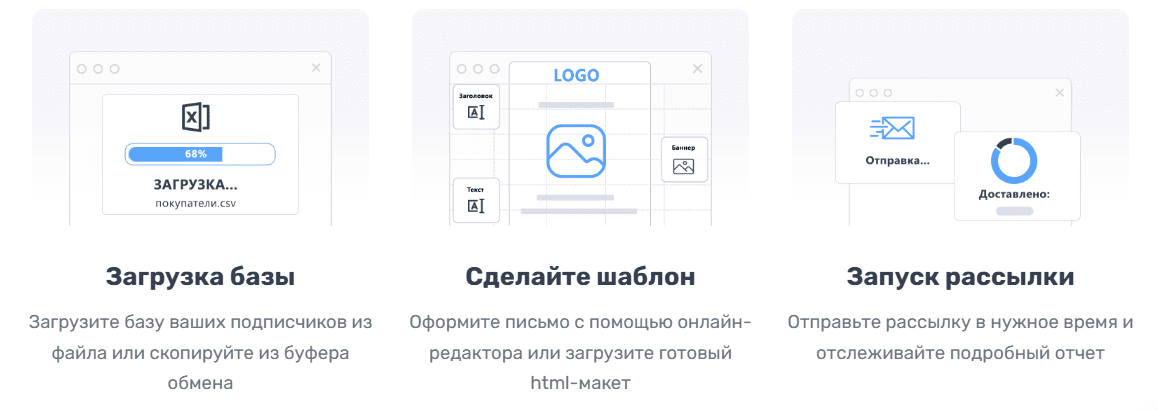
Step 1. Prepare the subscriber list
Start with contacts who should receive the campaign and check the import options available for your account. Depending on the workflow, these may involve:
- Uploading a file of customer email addresses.
- Pasting a prepared list of contacts.
- Connecting a CRM so that contact details and relevant audience segments can be transferred consistently.
Step 2. Create the email template
Use the email editor to build a clear layout around the main message.
- Choose an appropriate template or create a layout that suits your content.
- Add the images, buttons, links and personalised fields the message needs.
- Arrange the content so that the main point and next action are easy to find.
Step 3. Send the campaign and review the results
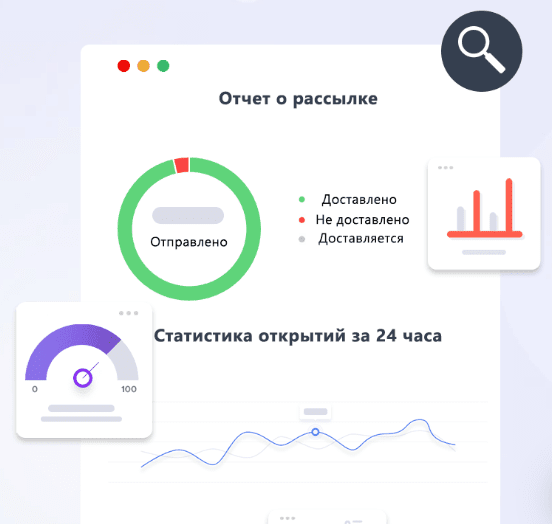
Once the email has been checked, select a sending time and launch the campaign. When reviewing the reports in Mailo.post, focus on measures that help you assess the campaign:
- The number of messages sent and delivered.
- Reported opens and link clicks.
- Audience responses and the actions taken after reading the content.
How to make an email worth opening
Preparing and sending an email is only part of the task. Recipients also need a clear reason to open it. Review the subject line, sender identity and preview text together.
1. Write a relevant subject line
The subject should tell readers what they can expect. These illustrative approaches work only when they accurately describe the message:
- “Your customer reward is ready”
- “A practical guide to planning your email campaign”
- “Your offer ends today”
Avoid vague wording, unnecessarily long subjects and exaggerated urgency. The email should deliver what its subject promises.
2. Use a recognisable sender name
Choose a sender name customers can associate with your business. A team name or a real employee’s name may be appropriate. For a service such as Mailo.post, illustrative formats might be:
- “Your contact at Mailo.post”
- “The team at Mailo.post”
3. Make the opening text useful
Email clients may display the start of a message as preview text. Use that space to explain its value:
- Less useful: “Hello, we would like to offer you…”
- More specific: “Here is the information you need to use your customer reward.”
4. Test the sending time
Choose a time that fits the audience, then compare responses across suitable alternatives:
- For a business audience, test times that fit the working day and the recipient’s time zone.
- For consumers, consider when the message is most useful in relation to the product or service.
Assess subject lines, sender names and timing through the results of your own campaigns. A sending schedule that suits one audience may not suit another.
Using CRM data to plan email campaigns
Customer information can make messages more relevant when it is accurate and used appropriately. Three useful approaches are segmentation, planned email sequences and event-based messages.
1. Relevant offers for different groups
Create audience segments around meaningful differences in customer needs:
- New customers may need an introduction to the product and the available purchasing options.
- Returning customers may find recommendations based on relevant purchase history useful.
- Inactive customers may benefit from a reminder of a service they previously used or an invitation to update their preferences.
2. Planned email sequences
Organise a sequence so that each message adds something useful. For example:
- Email 1: introduce the business and explain what the subscriber can expect.
- Email 2: show relevant product benefits and practical uses.
- Email 3: present an appropriate offer and explain the next step.
Review the response at each stage before adding more messages to the sequence.
3. Event-based messages
Define the customer action or event that should trigger a message. Possible scenarios include:
- A customer has left an order unfinished: consider a helpful reminder with a clear way to return to it.
- A product may need replenishing: choose a suitable interval based on its use and the customer’s purchase history.
- A customer has chosen to share a birthday: consider a relevant greeting or benefit under the programme’s rules.
A well-planned email workflow connects useful content with an appropriate moment. Review the customer experience as well as the resulting sales activity.
Working with an online email editor

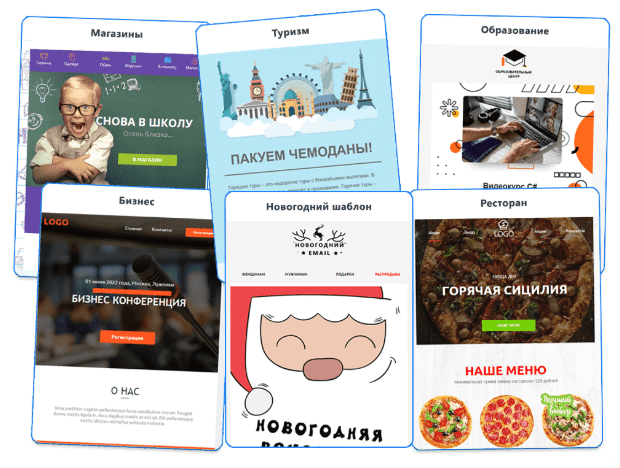
When using the email service Mailo.post, build and test a template that supports the message on the devices your audience uses.
Email-editor features to assess
- Templates.
Choose a layout suited to the content and adapt its appearance to your brand.
- Content blocks.
Arrange text, images and buttons in a logical order. Keep the main action easy to find.
- Mobile presentation.
Preview the email at smaller widths and check the size of text, images and buttons before sending.
- Personalisation.
Use customer fields only when they add useful context. Test how the email reads when a field, such as a first name, is missing.
How to avoid common email-campaign mistakes
1. Take care of your sending practices
Support a useful and consistent subscriber experience:
- Send campaigns to people who have subscribed to the relevant communication.
- Use the appropriate sending domain and maintain an accurate contact list.
- Avoid misleading claims, excessive capital letters and artificial urgency in the message.
2. Make the subject specific
A subject line should be engaging and relevant to the email. Illustrative options include:
- “How to plan an email campaign around a clear objective”
- “How to use your customer reward”
- “Common mistakes to check before sending your next email”
3. Keep the email easy to use
A useful email has:
- A clear structure: heading, main message and next action.
- A straightforward layout without unnecessary elements that make the message difficult to load or read.
- Buttons with descriptive actions, such as “View the offer”, “Read the guide” or “Register”.
Planning email automation
Automated messages can support recurring customer tasks. Define the trigger, audience and intended outcome before enabling a sequence.
Examples of automated communication include:
- Welcome emails.
Introduce new subscribers to the business and share the materials they need to get started.
- Reminders about unfinished orders.
Give customers a clear route back to the relevant order when a reminder is appropriate.
- Relevant product suggestions.
Use suitable customer preferences and activity to decide which information is helpful.
How to manage the cost of email campaigns
1. Segment the subscriber list
Group customers using criteria that change the relevance of a message, such as:
- Interests and preferences.
- Purchase and communication history.
- Location, when it matters to the offer or service.
2. Use reporting to improve the plan
Review reported opens, clicks and resulting actions. Compare appropriate variations of a message and relate the outcome to the time and cost required to produce the campaign.
3. Set a manageable sending frequency
Avoid sending more messages than subscribers find useful. Choose a frequency that fits the content, customer expectations and your team’s ability to maintain quality, then review responses and unsubscribes.
Is Mailo.post a suitable choice for your email workflow?

Mailo.post can be assessed against a practical checklist: preparing contacts, building emails, connecting customer data and reviewing results. Test a representative campaign and confirm the functions and account terms needed by your business.
Explore the service and check the current account options before planning a trial or campaign budget.
Contact our agency for help planning your email marketing. Find more useful guidance in our articles.