Discuss your goals and the next steps for your project


Consultation

Tell us about your project

ABS Marketing logo

Menu

Craftum: Planning a Business Website

Craftum website builder overview

Getting a business online

A business website brings your offer, contact options and sales process together. With a visual website builder, you can create the pages yourself and focus on the content customers need. This guide walks through the main stages of preparing a website and explains how Craftum can support the build.

Step 1: Choose your niche.

Research the market and identify customers’ needs and problems to understand which products or services you could offer. Consider what you do well and focus your offer around those strengths.

Step 2: Create a product or service prototype.

Create a small version of your offer that lets you gather feedback before a full launch. This could be a product sample, a limited service package or a demonstration. Use what potential customers tell you to refine the offer and the way you explain it on the website.

Step 3: Build a landing page.

A landing page presents a specific product or service and encourages a relevant next step, such as an enquiry or purchase. A website builder can help you assemble the page without writing its code from scratch.

Step 4: Set up payments.

If customers will pay through the landing page, configure the payment methods needed for your offer. Check the available integrations and their terms before accepting payments.

Step 5: Promote your business.

Once the landing page and payment process are ready, plan how to attract customers. Decide on a promotion strategy and budget. Possible channels include social media, search advertising and email marketing; the appropriate mix depends on the offer and audience.

Step 6: Review and improve the process.

After launch, review which channels bring useful enquiries and where visitors leave the purchase or contact process. Compare these findings with your goals, choose one change to test and measure its effect before making the next adjustment.

Prepare the content, payment requirements and promotion plan before you start building. Then choose tools that fit those requirements. One website builder to consider is Craftum.

What is Craftum?

Craftum is a visual website builder for business sites and online stores. You can start from a ready-made template or arrange your own page layout.
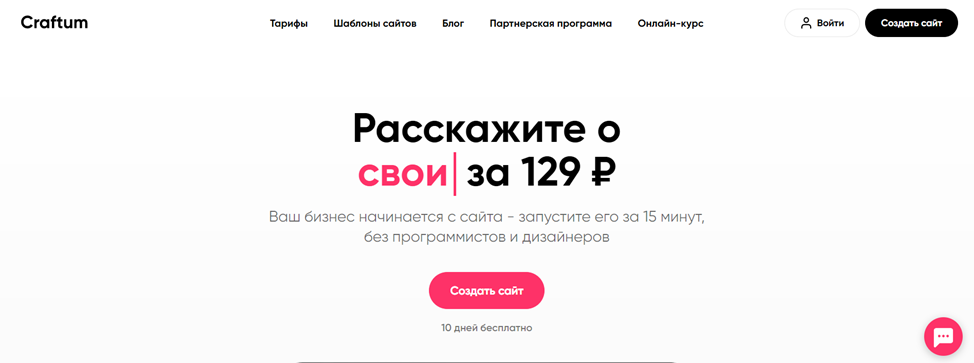
Craftum website builder overview

You can use Craftum to choose a template, customise the design and add your text and images. Prepare product information and contact details in advance so you can work through the page consistently.

The following features are useful when planning your site:

  • Ease of use.

The visual editor in Craftum lets you arrange page elements and edit their appearance without writing each section in code. Start with the main customer journey, then adjust the layout around it.
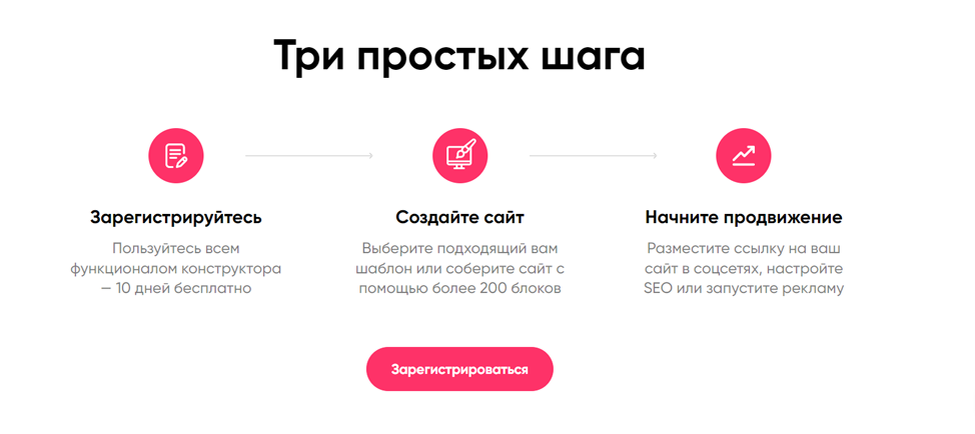
Craftum website builder overview
  • Website templates.

Choose a template for a website or online store, then replace its sample content with your own. Adjust the colours, fonts and sections to match your brand and the information your customers need.
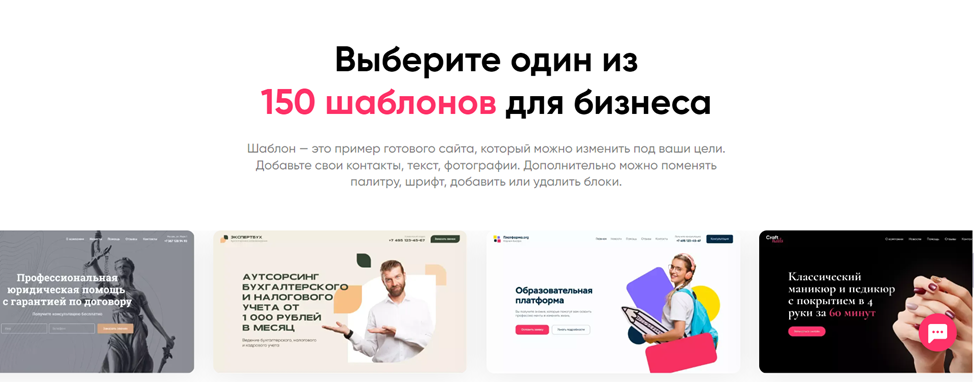
Craftum website builder overview
  • Payment and delivery settings.

Craftum supports payment integrations including YooKassa and Robokassa, along with delivery settings. For an international store, confirm that your chosen payment provider supports your business’s country, currency and settlement account.

  • Store management.

For online stores, Craftum includes order management, stock tracking and promotional codes. Use these tools to keep product availability and order information organised as the catalogue grows.

  • Marketing tools.

Craftum provides SEO settings for page titles, descriptions and headings, plus connections to analytics and other services. Plan email campaigns and social promotion alongside the site, choosing any additional tools those tasks require.

  • A structured launch workflow.

Build the core pages, configure payments where needed and test the enquiry or checkout process. Once the site is ready, direct visitors to it through the channels you have chosen and monitor how they use it.

  • Trial access.

Explore Craftum with its free trial. Build a representative page, try the editing workflow and check the integrations your project needs before selecting a paid plan.

Conclusion

Using Craftum gives a business a practical way to build a template-based website or online store. Estimate the work required for content, integrations and ongoing updates when planning your budget and launch date.

Consider Craftum against your content, payment and marketing requirements. A short test project can show whether the editing workflow suits the people who will maintain the site.

Contact our agency for help planning your website and marketing. You can also explore more of our articles here.
Share:

More articles

OUR TEAM

Behind every successful project is a team where experience, creativity, and collaboration come together. Our agency brings together experts from various fields of marketing: from strategy and analytics to design and social media management. We understand the market, know the tools, and speak the language of business.

WHY CAN YOU TRUST US?

Marketing support

Marketing support

Support for your marketing and advertising projects

Project team

Project team

Skills matched to your project's needs

Transparency and honesty

Transparency and honesty

Open communication throughout the entire partnership

Case studies

Cases

Use of modern technologies and tools

Client reviews

Reviews

A personalized approach to every client and project

SHALL WE DISCUSS YOUR NEEDS?

Please fill out this short form, and one of our experts will be happy to contact you to discuss your marketing goals and find the best solutions.

Where can we message you? (optional)

Select the messengers linked to the phone number above. Include the country code in your number.

You can enable SmartCaptcha to protect the form from automated submissions. External verification does not load before your separate permission.

Full SmartCaptcha permission text

This choice applies to forms on this page for up to 24 hours. Turning verification off reloads the page and clears entered text. Enquiry consent and analytics preferences are separate.

Without SmartCaptcha, email absmarketing.ru@gmail.com.

Submit a request

Where can we message you? (optional)

Select the messengers linked to the phone number above. Include the country code in your number.

You can enable SmartCaptcha to protect the form from automated submissions. External verification does not load before your separate permission.

Full SmartCaptcha permission text

This choice applies to forms on this page for up to 24 hours. Turning verification off reloads the page and clears entered text. Enquiry consent and analytics preferences are separate.

Without SmartCaptcha, email absmarketing.ru@gmail.com.

Leave Feedback and Suggestions

Your suggestions help us grow and improve — please share your ideas!

Where can we message you? (optional)

Select the messengers linked to the phone number above. Include the country code in your number.

You can enable SmartCaptcha to protect the form from automated submissions. External verification does not load before your separate permission.

Full SmartCaptcha permission text

This choice applies to forms on this page for up to 24 hours. Turning verification off reloads the page and clears entered text. Enquiry consent and analytics preferences are separate.

Without SmartCaptcha, email absmarketing.ru@gmail.com.

Feedback and Messages for Management

Your letters and feedback are important to us. You can contact management directly to share your thoughts.

Where can we message you? (optional)

Select the messengers linked to the phone number above. Include the country code in your number.

You can enable SmartCaptcha to protect the form from automated submissions. External verification does not load before your separate permission.

Full SmartCaptcha permission text

This choice applies to forms on this page for up to 24 hours. Turning verification off reloads the page and clears entered text. Enquiry consent and analytics preferences are separate.

Without SmartCaptcha, email absmarketing.ru@gmail.com.

Free consultation + a complimentary audit. Only 7 spots left.

Job application

Submit your application, and we’ll contact you to discuss the job openings!

Where can we message you? (optional)

Select the messengers linked to the phone number above. Include the country code in your number.

You can enable SmartCaptcha to protect the form from automated submissions. External verification does not load before your separate permission.

Full SmartCaptcha permission text

This choice applies to forms on this page for up to 24 hours. Turning verification off reloads the page and clears entered text. Enquiry consent and analytics preferences are separate.

Without SmartCaptcha, email absmarketing.ru@gmail.com.

Other questions

Send us your question—we’ll get back to you as soon as possible!

Where can we message you? (optional)

Select the messengers linked to the phone number above. Include the country code in your number.

You can enable SmartCaptcha to protect the form from automated submissions. External verification does not load before your separate permission.

Full SmartCaptcha permission text

This choice applies to forms on this page for up to 24 hours. Turning verification off reloads the page and clears entered text. Enquiry consent and analytics preferences are separate.

Without SmartCaptcha, email absmarketing.ru@gmail.com.

Would you like a free consultation with great terms? ​

Answer 4 short questions — and we’ll put together personalized marketing solutions for you, complete with bonuses from our partners.

Please provide your contact information, and we'll get in touch with you to discuss solutions that will take your business to the next level
Where can we message you? (optional)

Select the messengers linked to the phone number above. Include the country code in your number.

You can enable SmartCaptcha to protect the form from automated submissions. External verification does not load before your separate permission.

Full SmartCaptcha permission text

This choice applies to forms on this page for up to 24 hours. Turning verification off reloads the page and clears entered text. Enquiry consent and analytics preferences are separate.

Without SmartCaptcha, email absmarketing.ru@gmail.com.