Online appointment booking should make it easy for customers to choose a service and understand what happens next. When considering YCLIENTS (YCLIENTS website), start with the scheduling, customer-information and follow-up tasks your business needs to manage.
More enquiries are useful only when the business can respond and provide the service. Plan the route from an initial request to an available appointment, a confirmed booking and a completed visit. This makes it easier to identify the information and responsibilities the system must support.
This guide explores YCLIENTS as a tool for organising appointments, customer records and the daily work of a service business.
What is YCLIENTS?
YCLIENTS is a platform for appointment scheduling and customer management. It is designed around booking services and maintaining the related records. Assess the available functions against your service list, employee schedules and the booking experience you want customers to have.
Reporting can help a business understand appointment activity and its operations. Define the questions you need to answer, then check which data is recorded and how the relevant reports are produced.

How to plan bookings and customer management
1. Customer records:
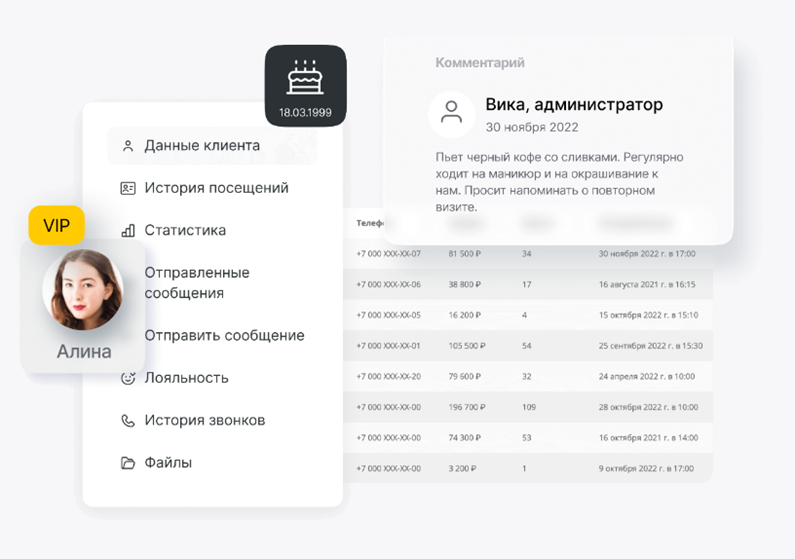
Decide which contact details, visit history and service preferences are useful to the team. Keep the information accurate and accessible to the appropriate staff so that it supports relevant, consistent service.
2. Online booking:
YCLIENTS can be assessed for allowing customers to select a service and an available appointment online. Test the booking journey, confirmation rules and change process. A clear setup should help staff and customers work from the same schedule.
3. The appointment calendar:
Use a structured schedule to connect appointments with the relevant service, employee and customer record. Decide which notes staff need and how they will record completed, changed or cancelled visits.
4. Financial and stock records:
Identify the revenue, cost and inventory information the business needs to manage. Review how the proposed system records transactions, product receipts, transfers and usage, and how those records relate to your accounting process. Assign responsibility for keeping the information complete and resolving discrepancies.
5. Payments and checkout:
YCLIENTS should be assessed against the payment methods and checkout tasks your business requires. Confirm the available providers and integrations, then test how an appointment, payment and any resulting document are connected.
6. Telephony:
If telephone enquiries are part of the workflow, check how the selected telephony connection associates calls with customer records. Confirm which functions are available and define how staff should handle missed calls and follow-up.
7. Managing several locations:
For a business with multiple branches or franchise locations, assess YCLIENTS for shared and local responsibilities. Consider schedules, staff permissions, reporting and the service information that should remain consistent across locations.
Planning the implementation from setup to daily use
A project using YCLIENTS should begin with the needs of the business. Document the service list, scheduling rules, customer records and stock information that must be prepared or transferred. Agree how the data will be checked before staff rely on it.
When configuring YCLIENTS, work through the tasks each role needs to perform. Prepare training examples for appointments, payments, changes and customer questions. Keep clear instructions available to the team. Introduce YCLIENTS through a controlled test and address problems before extending the setup to everyday operations.
What else should you assess?
· Support arrangements:
Confirm the current support channels, hours and scope. Decide how staff will report an issue and what they should do if a booking or payment task cannot be completed as expected.
· Connections to other services:
YCLIENTS should be tested with the specific tools your business needs. Confirm the available integration, the information it exchanges and who will maintain it. A connection should be judged by whether the complete workflow works correctly.
· Help and training materials:
Review the available documentation and training resources against the tasks your staff perform. Make useful instructions easy to find and identify where the team needs additional guidance.
· Suitability for your business:
Evaluate the system using your own service types, team roles and customer journey. Product popularity does not replace a practical test of the requirements that matter to your organisation.
· Providers and implementation partners:
YCLIENTS may form part of a wider setup involving other tools or service providers. Confirm each party’s responsibilities, support arrangements and the scope of any implementation work before proceeding.

These checks help you decide whether YCLIENTS fits your booking process and whether your team has the resources to maintain it effectively.
Planning the budget
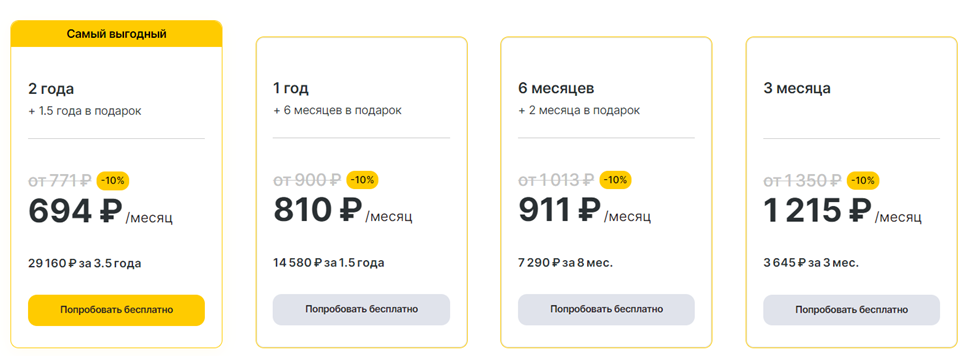
When comparing YCLIENTS account options, check the current terms for the staff, locations and functions you need. Include relevant integrations, setup work and training in the budget. Review costs against a defined workflow rather than assuming that a plan will generate more enquiries by itself.
Using customer feedback to improve booking
Customer feedback can reveal whether the booking process is understandable and whether the visit matches expectations. Review specific comments about finding a service, choosing a time, receiving confirmation and making changes. Use those observations to improve the process.

Checking current account terms
Confirm the current registration, trial and subscription conditions before committing to a plan. Do not base the budget on an unverified discount; compare the total cost of the configuration your business requires.
Putting the booking workflow into practice
A useful YCLIENTS implementation connects clear schedules, accurate customer records and staff responsibilities. Review the process regularly and use the available reporting to identify where customers or employees encounter difficulty. Assess YCLIENTS alongside your marketing and service operations so that enquiries can move into appropriate appointments and receive consistent follow-up.
Contact our agency for help planning your booking and customer-management workflow. Find out more on our website.