An online checkout connects the customer, the payment service and the business’s order records. Planning that connection involves more than adding a payment button: the merchant needs a clear way to confirm payments, handle errors and match transactions with orders. Fiscal receipt arrangements should also be considered separately where they apply.
One service to assess for an online checkout is Robokassa. Compare its current merchant requirements, available payment methods and integration options with the needs of your website. When assessing a proposed Robokassa setup, establish which services are included in the agreement and which require additional arrangements or charges.

Planning the payment workflow
A checkout built around Robokassa should offer payment methods appropriate to the merchant and its customers. Categories to review in the current service information include:
- Bank cards;
- Electronic wallets;
- Mobile payments and other supported methods.
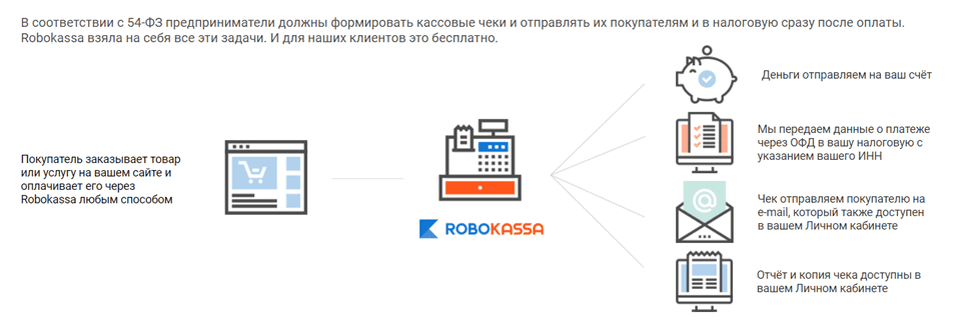
Define how a successful payment changes the order status and how staff will locate the transaction later. Review the available reporting and notification tools, and confirm whether the proposed setup covers invoices, payment confirmations and the information needed for reconciliation.
Robokassa service conditions should be reviewed before launch. Compare the applicable transaction fees, settlement arrangements and any separate charges for the payment methods you intend to offer. Base the decision on the current merchant agreement and expected transaction volume.
The following sequence helps organise setup and testing. The exact steps depend on the merchant’s requirements and the integration chosen.
- Register with Robokassa. Check the current application requirements and supply the requested merchant information. Assign responsibility for the account and protect access credentials. Complete any required approval steps before treating the checkout as ready for customers.
- Select payment methods. Decide which methods your customers need, then confirm which are available for your account with Robokassa. Test the selected methods individually rather than assuming that every option shown in general product information is enabled for every merchant.
- Define the checkout configuration. Identify the website or store receiving payments, the order information passed to the payment service and the destination for payment notifications. Confirm how any required receipt service fits into that configuration.
- Set the payment details. Check amounts, currency, product descriptions and the treatment of delivery charges. Coordinate tax and receipt settings with the person responsible for the business’s accounting, and verify that the checkout displays the intended information.
- Verify payment confirmation. Test what the website does after a successful, cancelled or interrupted payment. Confirm how Robokassa sends the relevant payment status and how the website associates that status with the correct order. Avoid fulfilling an order solely because a customer reaches a return page.
- Plan reporting and reconciliation. Establish which reports the team will use and how often payments will be matched with orders and settlements. Include a procedure for investigating discrepancies and recording refunds, so that customer support and accounting work from consistent information.
Document the chosen configuration and keep the support contacts available to the team. Repeat the relevant checkout tests when changing the website, payment methods or connected systems.
Evaluating Robokassa
Robokassa payment information can be used to assess options relevant to a Russian-market checkout. Confirm account eligibility and current availability for each method you plan to offer, including:
- The Faster Payments System (SBP);
- Yandex Pay;
- Bank cards such as Mir;
- Electronic wallets.
A useful selection of payment methods reflects customer needs and the business’s operating conditions. Consider the checkout experience, settlement arrangements and support requirements for each selected method, rather than choosing by the number of advertised options alone.
Other areas to assess:
- Day-to-day usability. Check whether the people responsible for orders can find payments, understand their status and obtain the required reports. A clear division of responsibilities reduces reliance on a single administrator and makes routine questions easier to resolve.
- Account and transaction security. Robokassa integration should be assessed alongside the website’s own security controls. Protect credentials, limit administrative access and follow the provider’s current instructions for authenticating payment notifications. Establish a response procedure for suspicious or inconsistent transactions.
- Configuration options. Confirm which settings the merchant can control and which are determined by the service agreement. Check payment descriptions, supported currencies and the information exchanged with the store, without assuming that transaction fees or every checkout option can be changed freely.
- Technical support. Review the available support channels and keep the information needed to describe an integration problem. Identify who will handle technical incidents and who will communicate with customers about individual payments.
- Website integration. Robokassa should fit the website’s ordering process. Assess the proposed connector or integration method, test it with the store configuration and confirm how updates will be maintained. Include unsuccessful payments and refunds in the acceptance checks.
A considered Robokassa setup brings payment acceptance, order management and transaction records into a coherent workflow. Review current product information and merchant conditions on the provider’s website before selecting the configuration for your business.
For help planning your website and checkout integration, contact ABS Marketing. Explore our website.